
Instagram is one of the biggest social platforms in the world, but as much as it connects us, it can also bring uncomfortable situations. Someone may keep bothering you in the comments, you may not want to block them altogether, or you want peace without creating drama. That’s precisely why Instagram introduced the Restrict feature. It gives you a subtle way to protect your space without letting the other person know.
But what really happens behind the scenes when you restrict someone? Does Instagram notify them? Will they still see your posts? Can they still message you? In this detailed, easy-to-understand guide, you will learn everything that happens when you restrict someone on Instagram, how the feature works, and when you should use it.
What Does “Restrict” Mean on Instagram?
Restricting someone is like putting a soft boundary between you and that user. Unlike blocking, which cuts off interaction completely, restricting creates a quiet barrier. It limits how the person interacts with you and keeps their activity less visible, without them realizing anything has changed.
Think of the Restrict feature as “silent mode” for annoying or uncomfortable interactions.
Does Instagram Notify Someone When You Restrict Them?
No, Instagram does not send any notification when you restrict someone. This is the main reason people choose restriction instead of blocking.
The restricted person has no idea that anything has changed. They can still visit your profile, like your posts, and send messages, but they won’t know that those interactions behave differently for you.
What Happens to Comments When You Restrict Someone?
One of the most significant effects of restriction is on comments.
Their Comments Become Hidden From Others
When a restricted user comments on your post, only you and that user can see it by default. The comment will not automatically appear to the public.
You Get the Option to Approve or Delete
Instagram gives you three choices for restricted comments:
- Approve it to show publicly
- Delete it
- Leave it hidden
This helps you avoid awkwardness, especially if someone tends to leave negative, embarrassing, or unwanted comments.
They Won’t Know Their Comment Is Hidden
The restricted user thinks their comment was posted normally. They do not get any indication that their comment is visible only to them.
What Happens to Messages When You Restrict Someone?
Messages are another central area affected by restriction.
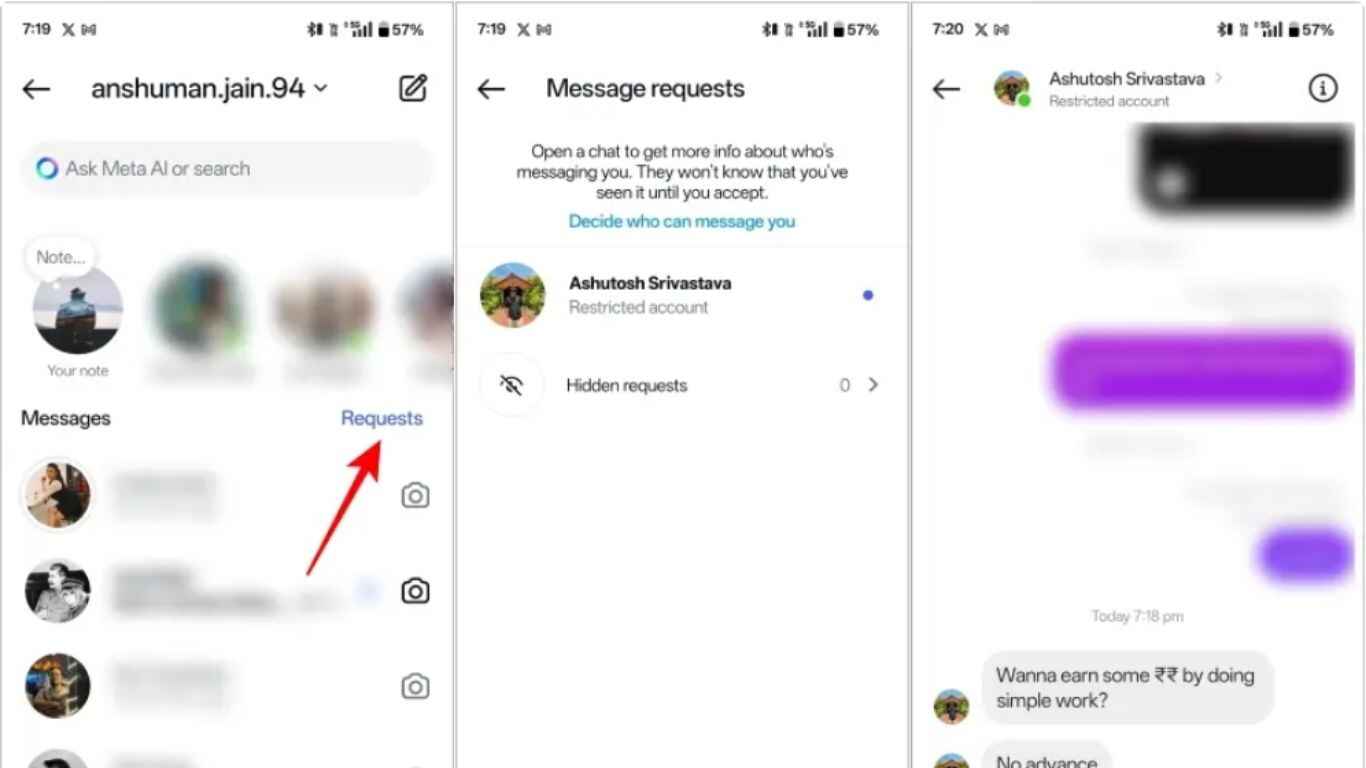
Their Messages Move to “Message Requests”
Once restricted:
- Their new messages won’t appear in your primary inbox.
- Instead, they’ll go to the Message Requests folder.
This helps you avoid constant notifications.
You Can Read Their Messages Without Them Knowing
When a restricted person sends you a message:
- You can read it quietly.
- No “Seen” receipt will appear to them.
- They won’t know whether you opened or ignored their message.
This is one of the most significant advantages of restriction.
They Can Still Send Messages
Restriction does not entirely block messaging. The person can continue sending messages, but you’re in complete control of whether you engage.
Can a Restricted Person See Your Posts and Stories?
Yes. Restricting someone does not stop them from seeing your content.
They can still:
- View your posts
- Watch your stories
- Like your photos
- See your reels
- Visit your profile
However, remember:
- They cannot see when you are active.
- Their likes and comments won’t be highlighted to you.
If you want to hide your posts or stories, restricting access isn’t enough; you will need to use blocking or Close Friends for story control.
Will You See Their Posts and Stories After Restricting Them?
Yes, unless you mute them. Restricting someone doesn’t automatically mute their posts or stories. If you want to stop seeing their content
- Visit their profile
- Tap “Following”
- Choose Mute
This lets you fully clean your feed without unfollowing or blocking them.
Beware! How to Unsend an Email in Outlook
Does Restricting Someone Hide Your Activity Status?
Yes. Restricting a user automatically hides:
- Your online status
- Your “Active now” indicator
- Your “Active x minutes ago” information
- Your typing indicator in DMs
This means the restricted person cannot track when you are online or available.
Will You See Their Activity Status After Restricting Them?
No. After restricting someone, you also lose the ability to see their activity status. Instagram makes this fair: if they can’t see yours, you can’t see theirs.
Can Restricted Users Tag or Mention You?
Yes, they can still tag or mention you in posts, comments, or stories.
However:
- You will get fewer notifications.
- Instagram may send the mention to the “Message Requests” section instead of your primary inbox.
If someone is tagging you too much, move from restriction to blocking.
Can Restricted Users Still Like Your Posts?
Yes, they can still like your posts.
However:
- Their likes won’t appear at the top of your notifications.
- You may not notice them unless you actively search for them.
Instagram tries to minimize its visibility in your notifications.
Can You Restrict Someone Without Unfollowing Them?
Yes, restriction does not affect your follower relationship.
You do not unfollow them, and they do not unfollow you. Everything looks normal from their side.
This is one reason many people use restriction instead of blocking to avoid questions like:
“Why did you unfollow me?”
Will They Know You Restricted Them?
No, unless they notice small behavioral clues like: You’re not replying to their messages, Their comments always seem hidden and Messages only show “Delivered,” never “Seen”. But these clues are subtle. Most people never realize they’ve been restricted.
What Happens to Old Comments After Restricting Someone?
If the restricted person left comments before you restricted them, the old comments stay visible and those comments do not automatically hide and the restriction only affects new comments. If you want to hide old comments, you must manually delete or hide them.
What Happens When You Unrestrict Someone?
If you decide to unrestrict them:
- Their new messages will return to your primary inbox.
- Their future comments will automatically become public.
- They’ll regain the ability to see your activity status.
- You will also see their activity status.
Unrestricting is reversible and simple.
Restriction vs. Block vs. Mute: What’s the Difference?
Restrict
- Soft boundary
- They do not know
- Comments become hidden
- Messages go to requests
- No activity status visibility
- They can still see your posts
Block
- Hard stop
- They cannot find your profile
- Cannot send messages
- Cannot comment
- Cannot see your posts or follow you
- They will notice eventually
Mute
- You stop seeing their posts or stories
- They won’t know
- You still follow them
- They can interact normally
Which One Should You Use?
- Restrict: For subtle control without drama
- Block: For safety, harassment, or total separation
- Mute: For personalized feed control
Why Do People Use the Restrict Feature?
The restrict feature is designed to protect your mental and emotional well-being. Here are the most common reasons people use it:
To Avoid Online Harassment
If someone’s comments are rude, sarcastic, or manipulative, restriction helps you control the situation quietly.
To Limit Interactions With Strange or Uncomfortable Followers
If a stranger keeps commenting or messaging too much, restriction lets you maintain privacy.
To Avoid Drama With Family or Friends
If you do not want conflict, restricting is better than blocking.
To Maintain Professional Distance
Content creators, influencers, and public personalities often use restrictions to manage their audience politely.
Is Restricting Someone on Instagram Bad or Rude?
Not at all. Restriction is a personal boundary-setting tool. It doesn’t harm anyone because Instagram doesn’t notify them. It simply gives you more peace, fewer distractions, better control, privacy in DMs and protection from negativity. So using it is entirely okay, especially if it improves your mental space.
How to Restrict Someone on Instagram
There are three easy methods:
From Their Profile
- Open their profile
- Tap the three dots ( ⋮ )
- Select Restrict
From a Comment
- Long-press the comment
- Tap Restrict
From Your Settings
- Go to Settings and Privacy
- Choose Restricted Accounts
- Add a user manually
What Happens if You Restrict a Follower?
If the person is already following you:
- They will still follow you
- They can still see your content
- Their interactions are limited
Restriction does not remove followers.
What Happens if You Restrict Someone You Don’t Follow?
If you restrict a user who does not follow, nothing external changes.
They can still:
- View your public posts
- Comment
- Send messages
But all interactions stay restricted privately.
Does Restriction Affect the Algorithm?
No, restricting someone doesn’t affect your social activity ranking, reach, or engagement. It is purely a privacy control tool. Their likes and comments still count, even though comments remain hidden until approved.
When Should You Avoid Using Restrict?
Restriction is helpful, but not consistently enough. Avoid using it when:
- Someone is harassing you aggressively
- Someone is stalking or threatening you
- Someone is repeatedly creating fake accounts
- You need legal or safety protection
In such cases, blocking or reporting is safer. Visit SEOToolzz for more related information.
